I built an entire ERP with AI. The most important decision was putting zero AI inside it.
How I took a fresh produce distributor from paper and pocket calculators to a tailored operating system, from on-site field research to production security.
RodrigoApril to August 2026NR Hortifruti · Guarapuava, PRDiscovery · Definition · Design System · Delivery
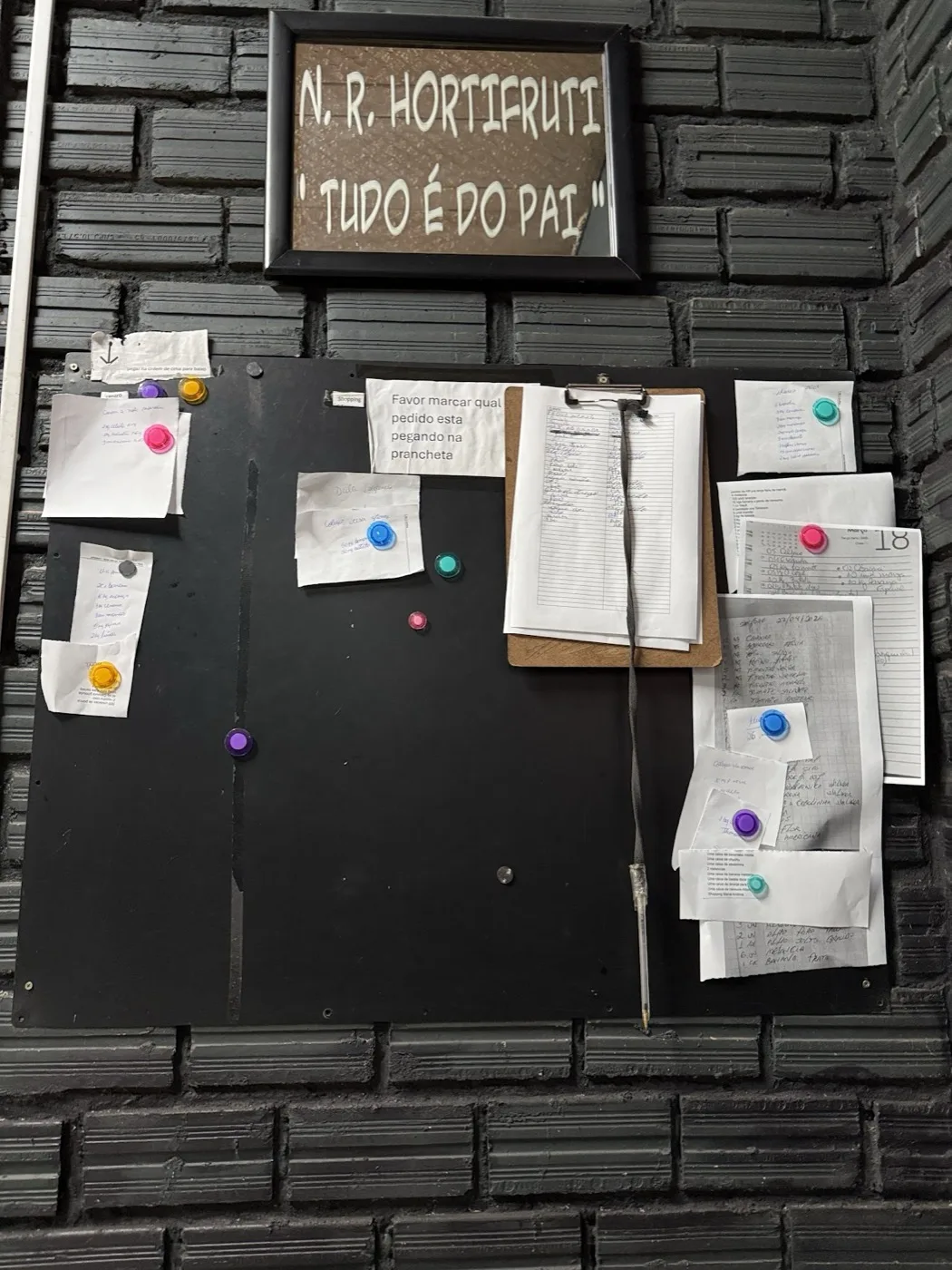
Before · the bulletin board
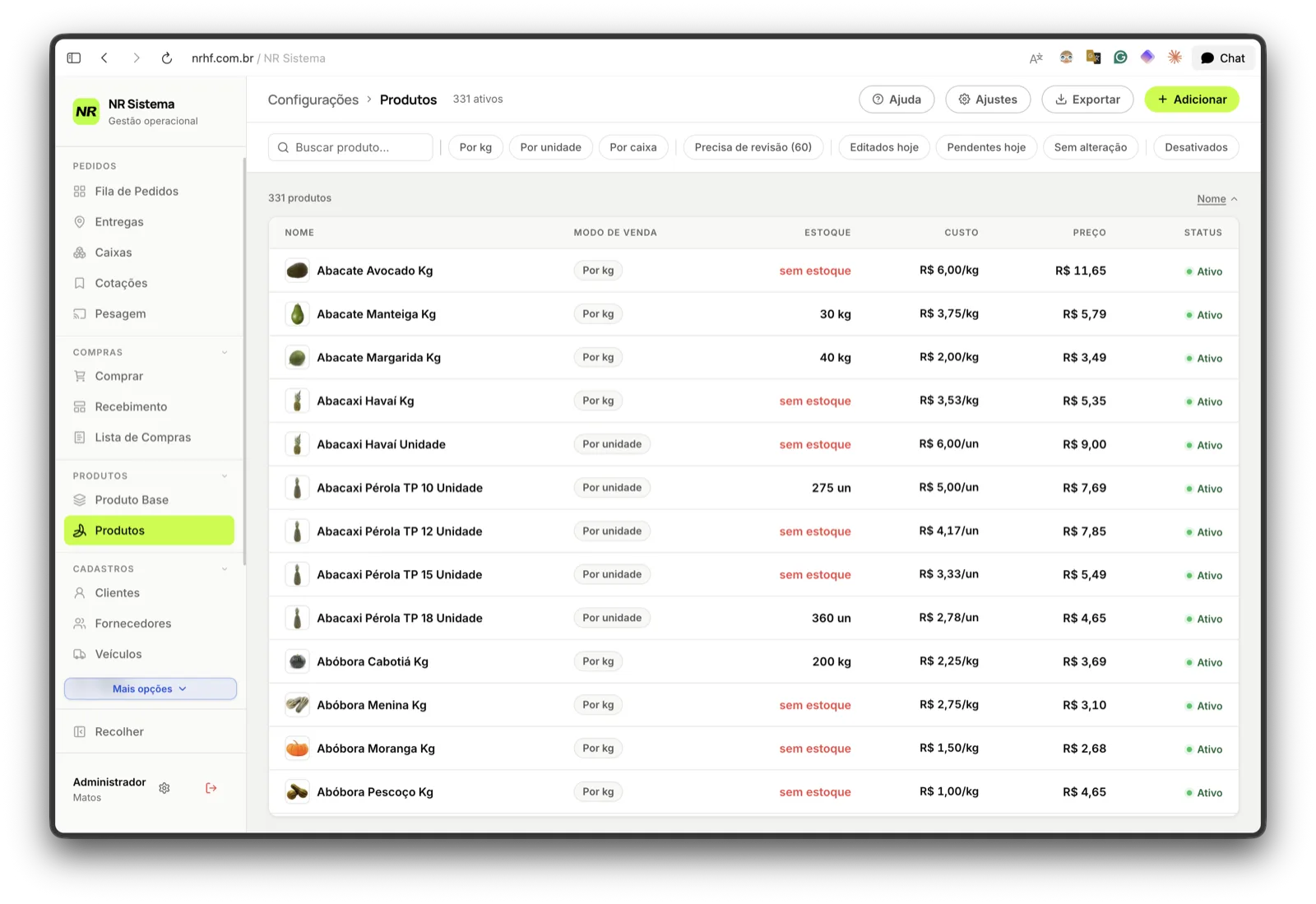
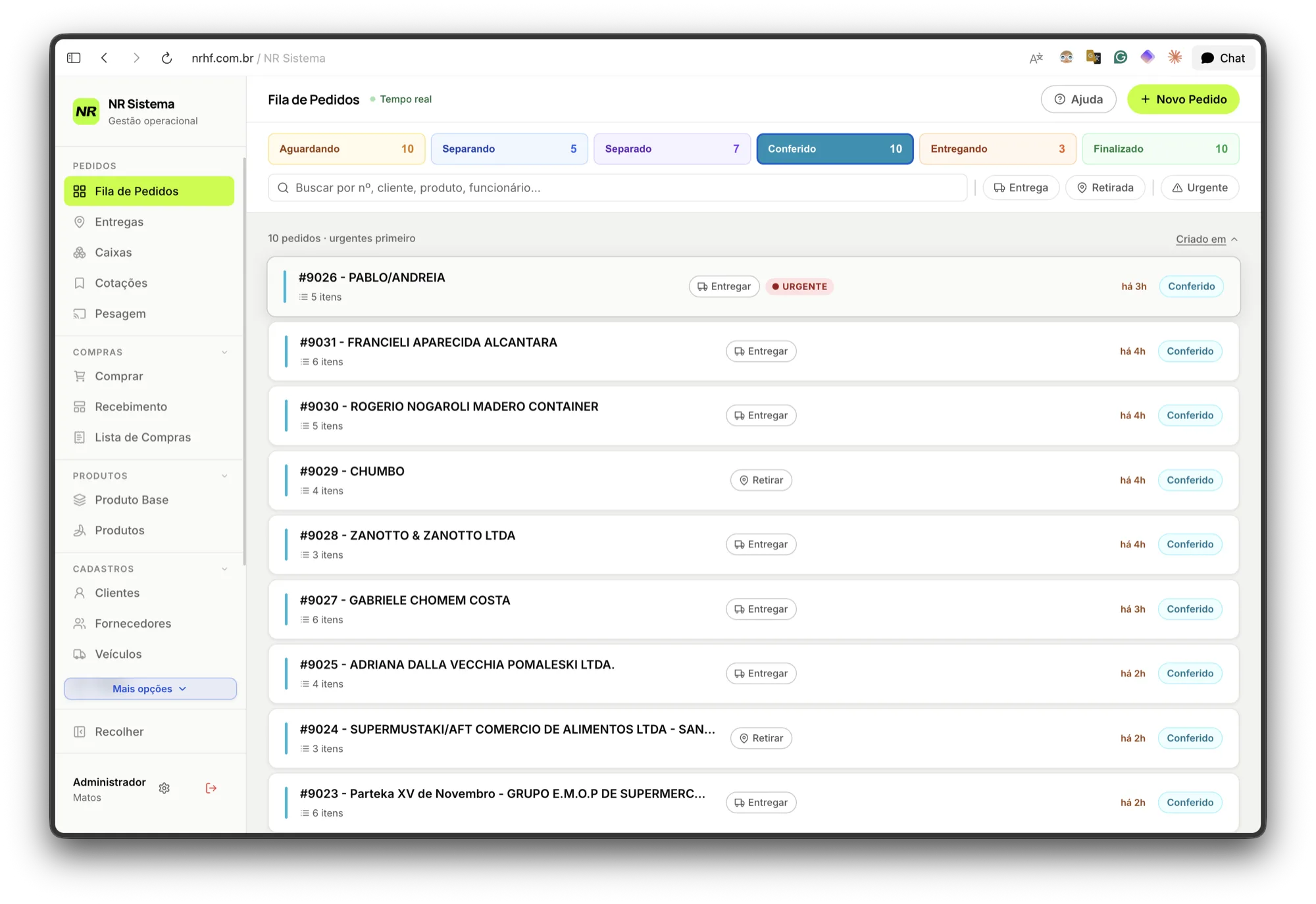
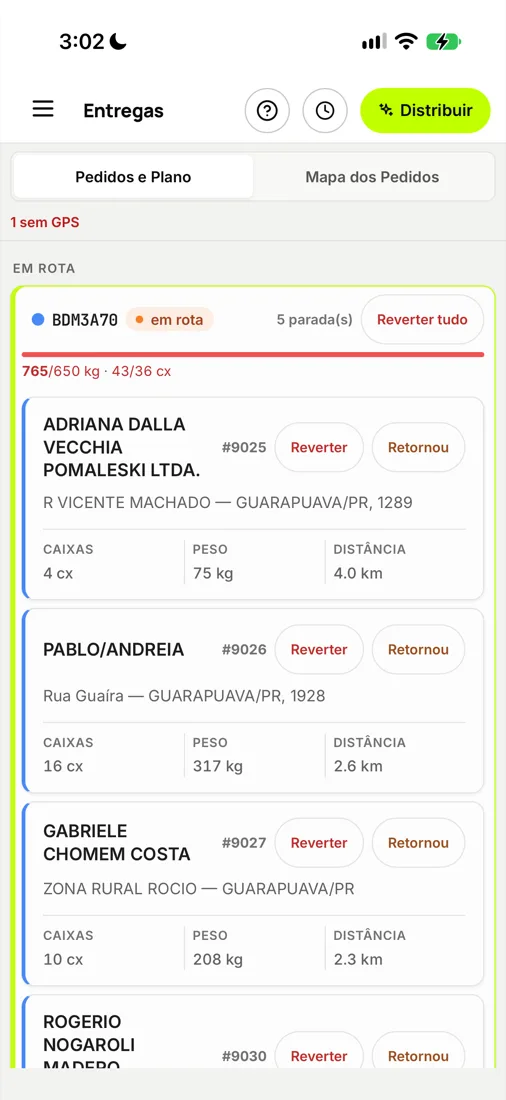
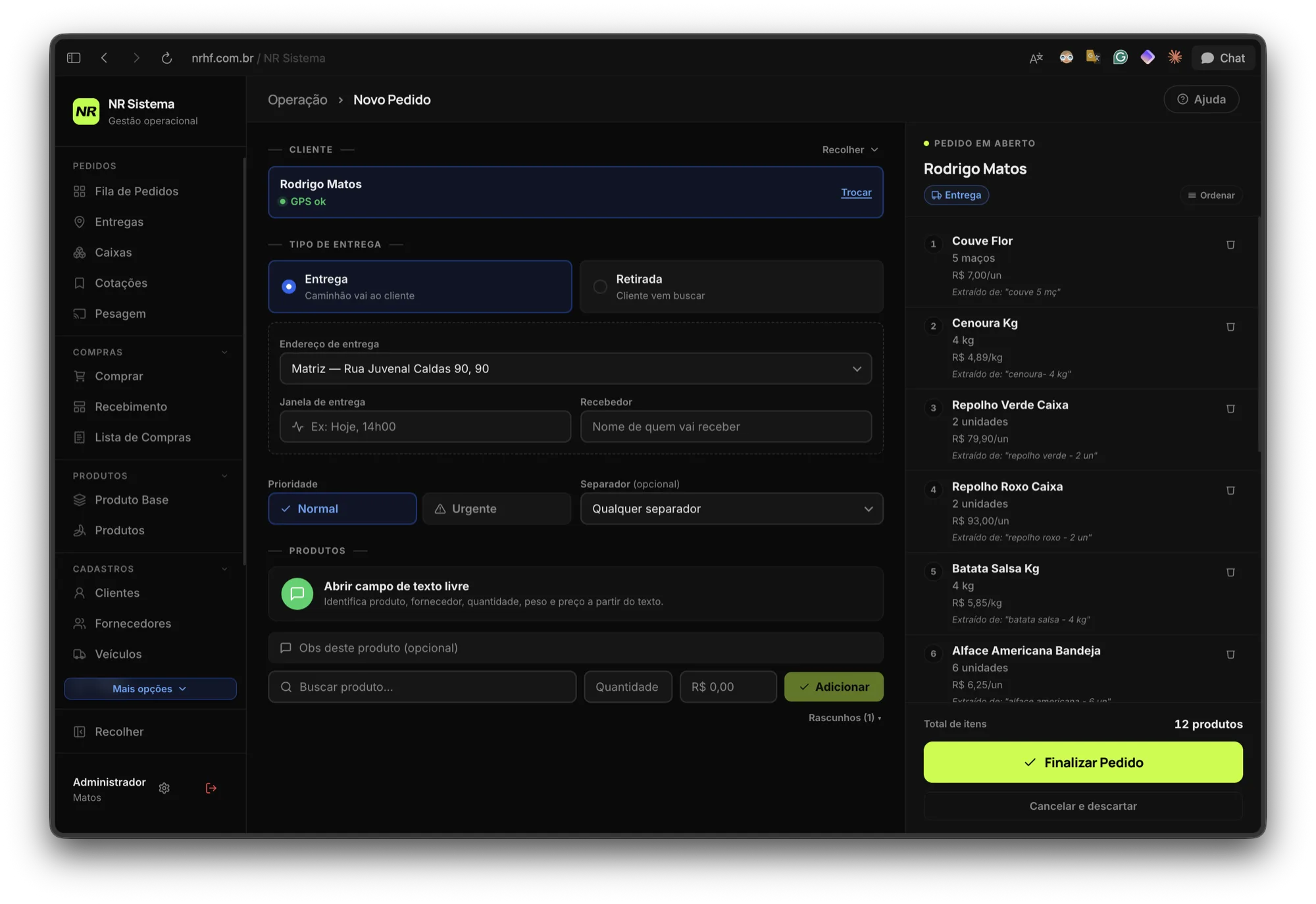
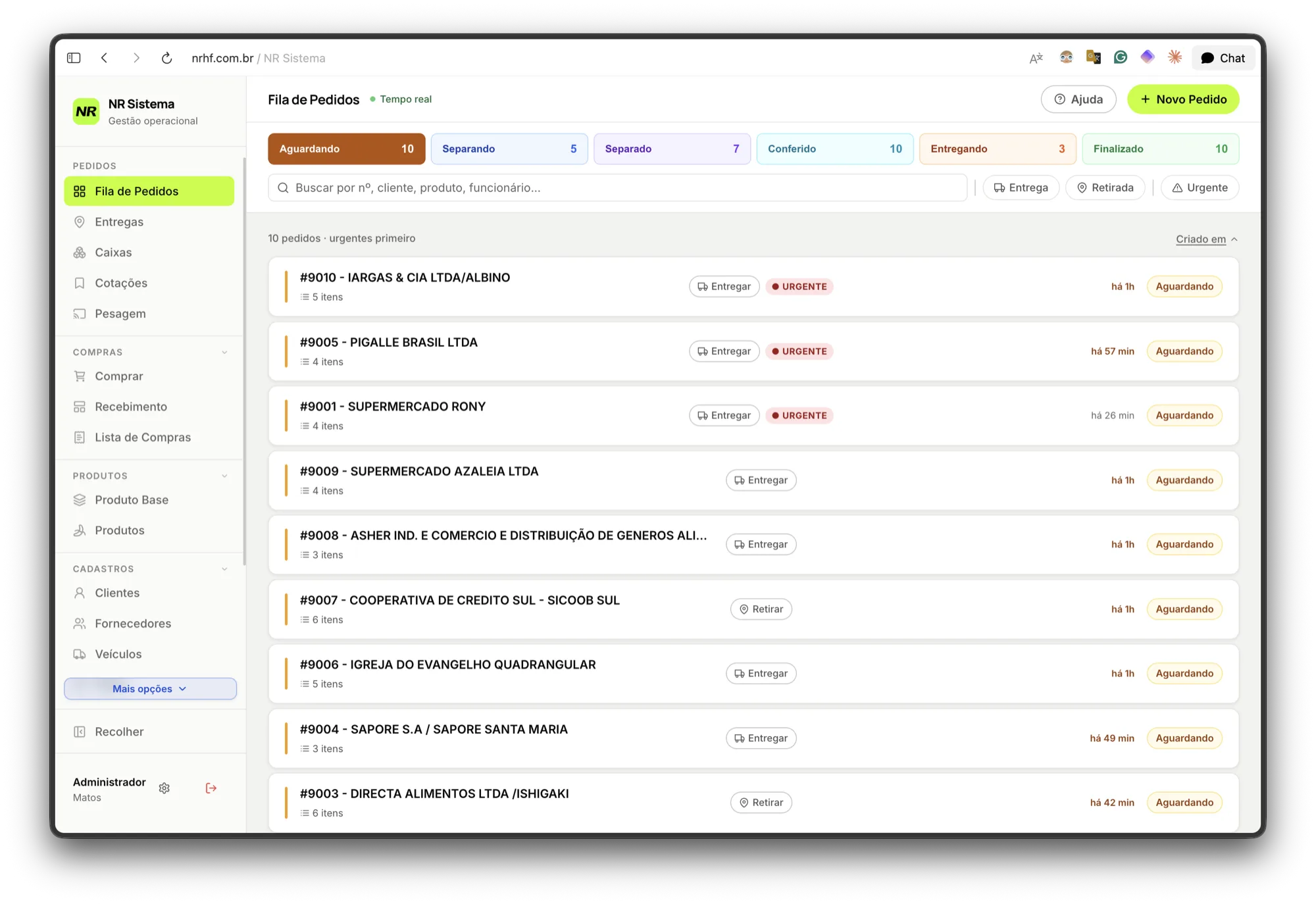
After · the live Order Queue
The project's initial state, and what replaced it. On the left, where orders lived: paper taped to a board. On the right, the exact same information with live status, urgency, and elapsed time—without relying on someone remembering to pull the paper down.
Everyone in 2026 has a project built with AI. Almost all of them are generic, and almost none have a real active user.
This one is specific. It was designed for an active business with a real name, physical address, and 35 registered employees. And the hook that matters to me isn't that I used AI to build it. It's that, with frontier AI freely available in my editor, I decided not to put any AI inside the product. That is the decision I take the most pride in defending.
Before that decision, the full journey: how I uncovered the root problem, what field research revealed that no briefing requested, how design decisions were formulated, and what exists today in code, database architecture, and production security.
Watch the video walkthrough where I present this project.“I built an ERP alone with Claude Code” · 21 min
01
The business, and what it demands from software
NR buys fresh fruits and vegetables at the CEASA wholesale market in Curitiba and resells them in Guarapuava to supermarkets, restaurants, hotels, and retail consumers. Their competitive moat is dedicated round-trip refrigerated logistics, guaranteeing freshness and SKU variety that local competitors cannot match.
The entire operation, from wholesale buying to final delivery, ran on physical paper, pocket calculators, WhatsApp voice notes, and spreadsheets. Inventory was managed “by eye.”
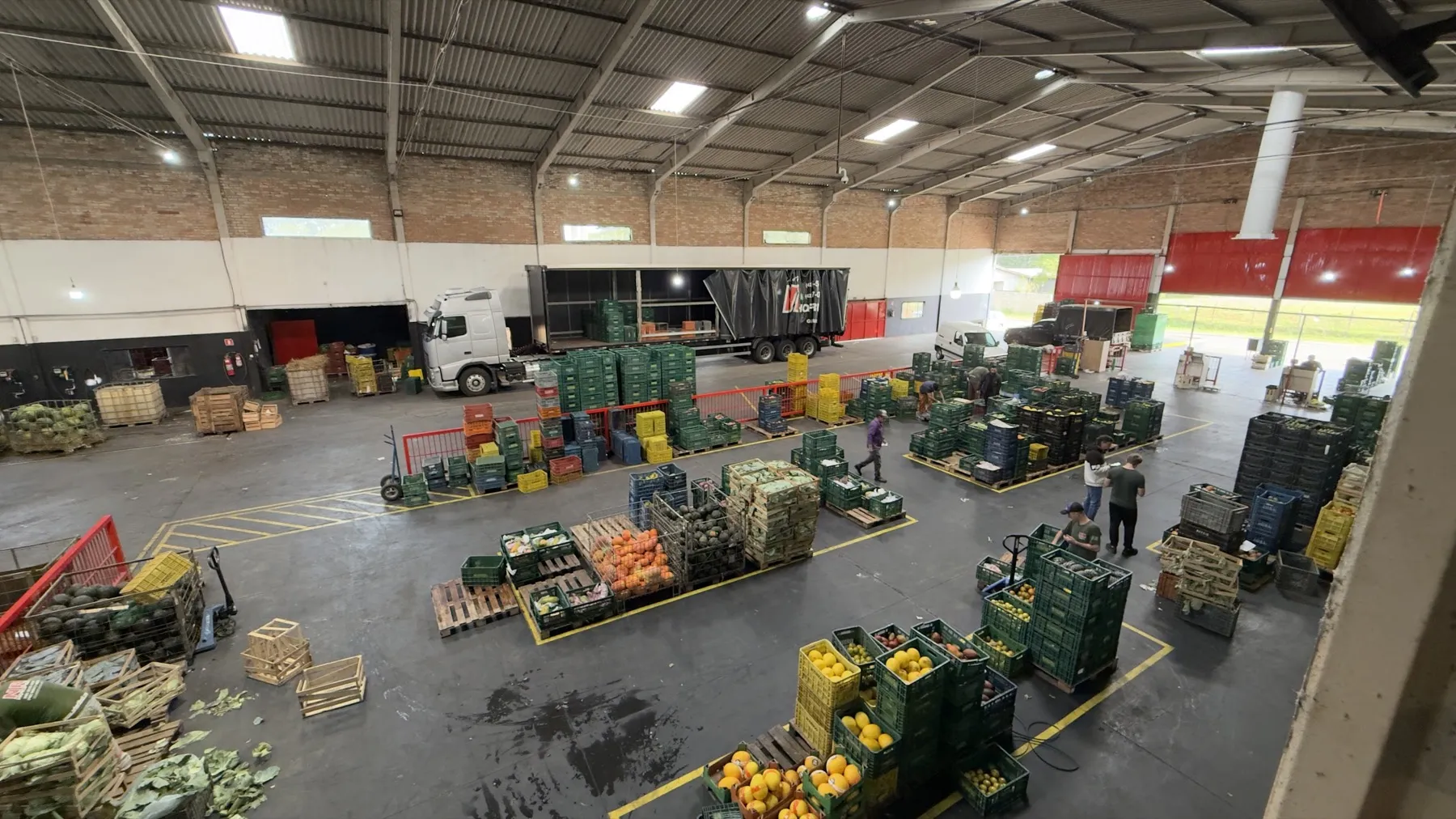
The warehouse in Guarapuava on an ordinary morning. Crates stacked on pallets, trucks backed into the dock, produce constantly in motion. This was the physical operation the software had to capture without getting in the way.
And it possesses two fundamental characteristics that define everything that followed:
Extreme volatility. Product prices fluctuate within four hours. Crop weather shifts grade quality overnight. Suppliers vanish without notice. Crate weights vary widely. The same item is bought by the wholesale crate and sold by the kilo, unit, or sealed box depending on the client.
Tacit knowledge trapped in human heads. What to buy, how much to purchase, which restaurant accepts which variety, delivery time windows, and what “Pineapple Type 2” means to one specific chef. None of this was written down anywhere.
An operation like this cannot fit into an off-the-shelf SaaS template. From this realization came the governing rule of the entire project:
The company's operation must not bend to software. The software must adapt to the company's operation.
02
Discovery: on-site field research, not design briefings
There was no design briefing. There was the warehouse floor.
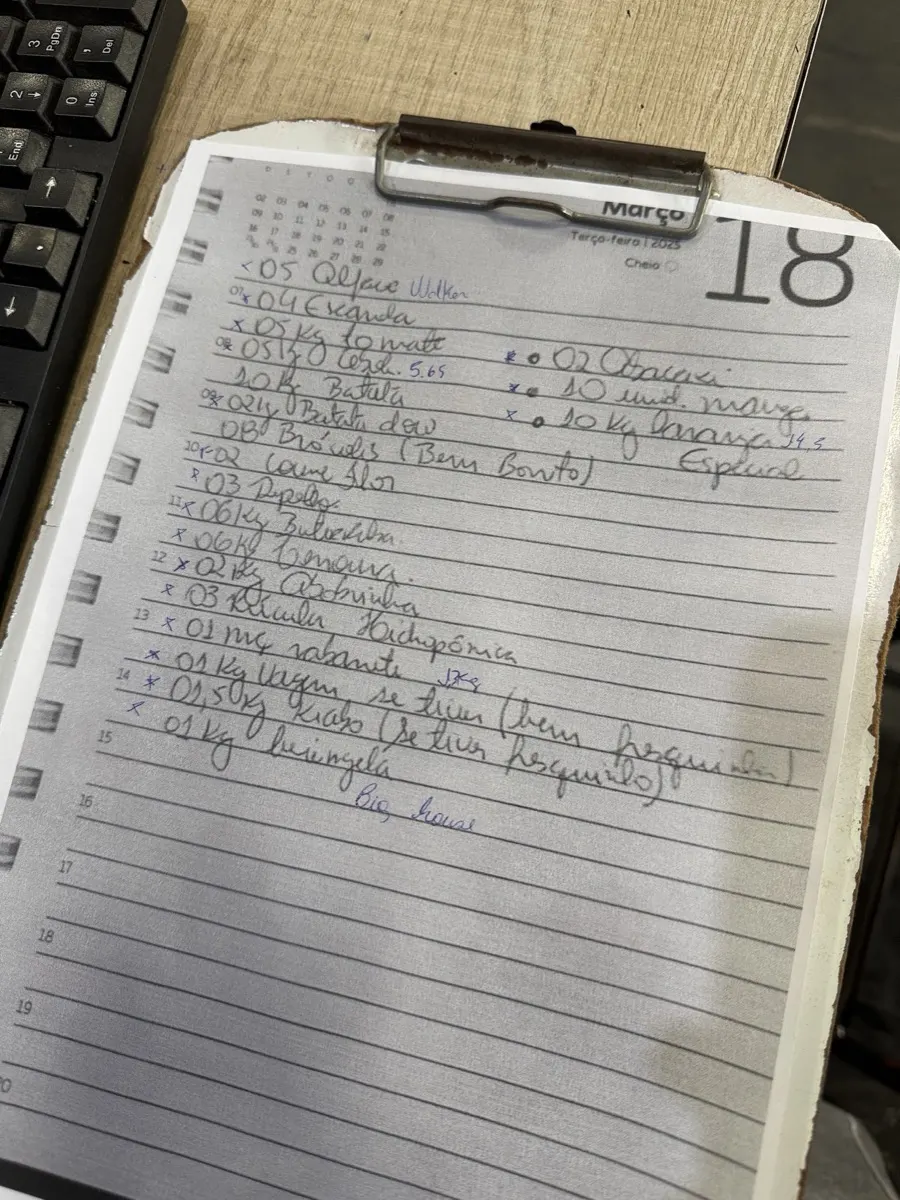
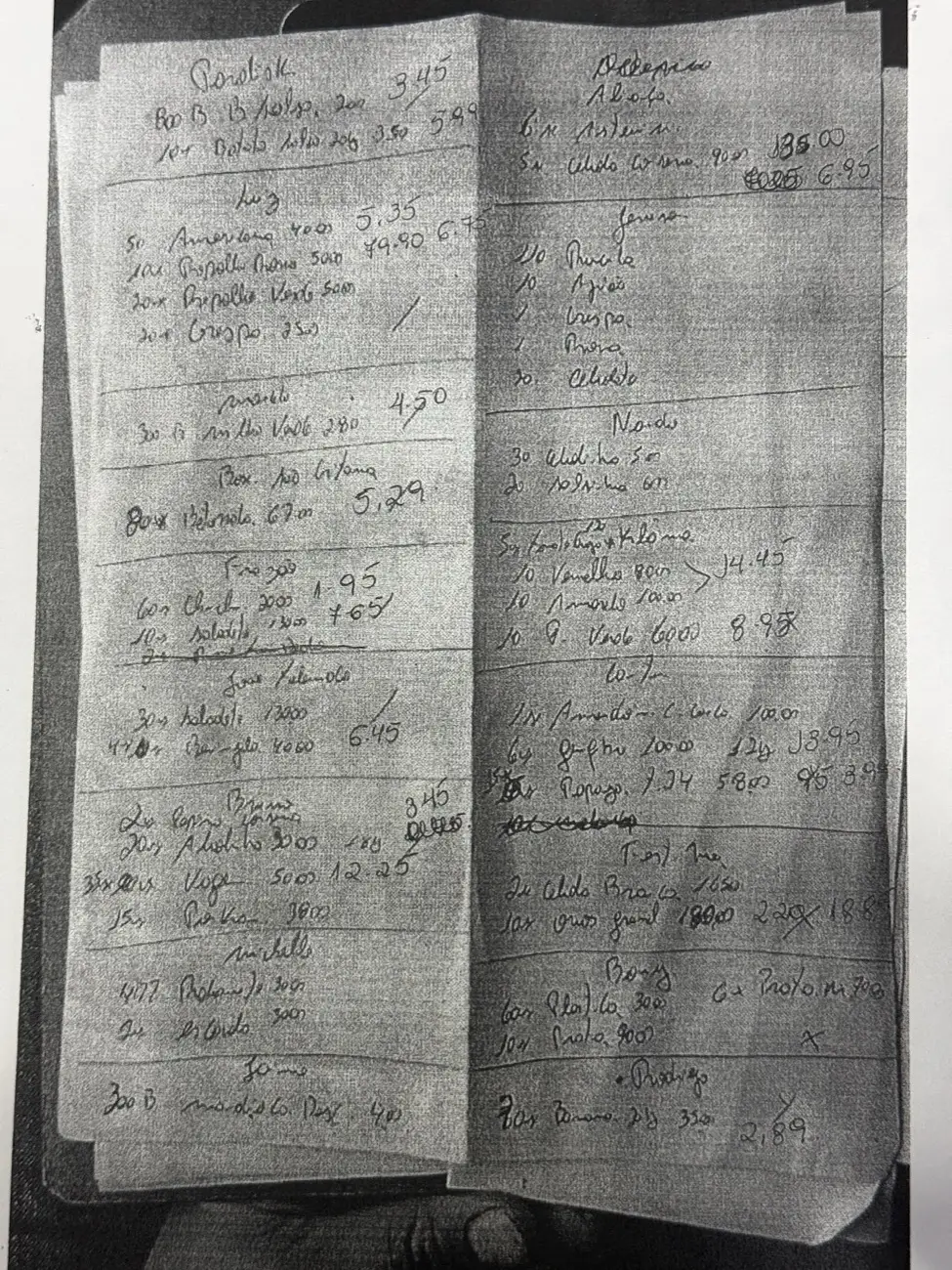
One of the physical artifacts analyzed during discovery. Notice nuances no generic form field captures: “green beans if available (extra fresh)” and “okra (fresh only)”. Conditional requests and quality thresholds written right alongside quantities.
Method
What It Uncovered
Recurring On-Site Observation
Physical artifacts nobody mentions in an interview: the buyer's handwritten A4 sheet, the tape board, the clipboard, the four floor scales. And behavioral patterns visible only in live action:
The disparate ways clients place orders, and how orders reach the floor: printed or scribbled
Visually identical fruit varieties prone to picking mix-ups
Structurally flawed order checking habits
Variable purchasing and selling units for the exact same SKU
Every system persona originated from a real worker with a physical problem
Audio Transcription
Pricing formulas captured directly: 4 calculation rules existing only in one person's head
Physical Artifact Analysis
Spreadsheets, CSV exports, buyer order sheets
Legacy Data Audit
72,992 rows of historical transactions migrated and normalized
AS-IS / TO-BE Documentation
Two extensive domain specs written before the first line of code
The opening question that framed the project
In my first conversation with the owner, I didn't ask what features he wanted. I asked:
“What happens to the business if you can't show up tomorrow?”
The answer was: it halts. The buyer is the only person who negotiates, doing so over WhatsApp with a supplier network only he knows. The attendant is the only one who knows how to decode ambiguous client notes. The checker is the only one who knows client delivery schedules.
This re-anchored the project. The product is not “an ordering system.” It is the externalization of an entire company's tacit operational knowledge, without destroying the operational agility that keeps it profitable.
What field research uncovered that nobody asked to solve
These are discoveries, not feature requests.
Orders only entered the database at weighing time
The attendant received requests on WhatsApp, wrote them by hand on scrap paper, and taped them to a board. The picker grabbed the sheet, assembled items, moved to the scale, and only then created the order in the database by typing what they had just weighed. Hours passed between a client ordering and the database knowing anything existed.
Order checking was validating the wrong source
The checker took the sheet printed by the picker and verified items against what the picker had weighed. Never against what the client had actually ordered.
Reflect on that for a moment. If a picker forgot an entire crate of lettuce, checking passed with 100% perfection because the forgotten crate was absent from the picker's printout. It was a quality control gate mathematically incapable of catching the most common human picking error. Nobody in the company realized, because from inside the routine it looked thorough.
This was the most impactful discovery of the engagement, and it came from zero client prompts.
Order priority was physical, and therefore bypassable
There was no priority field. The attendant taped urgent orders higher up on the board, expecting pickers to pull top-to-bottom. The business rule was implemented in masking tape.
Except nobody was policing it. Because the board was physical, pickers could freely pick lower sheets—choosing easy short orders or massive ones that weren't urgent. Long orders kept pickers occupied without delivering what clients needed right away.
This is the failure mode of purely physical workflows: where loopholes exist, humans gravitate toward reduced effort. The board wasn't bypassed out of malice; it was bypassed because nothing in the workflow made the choice visible.
The software lacked accountability
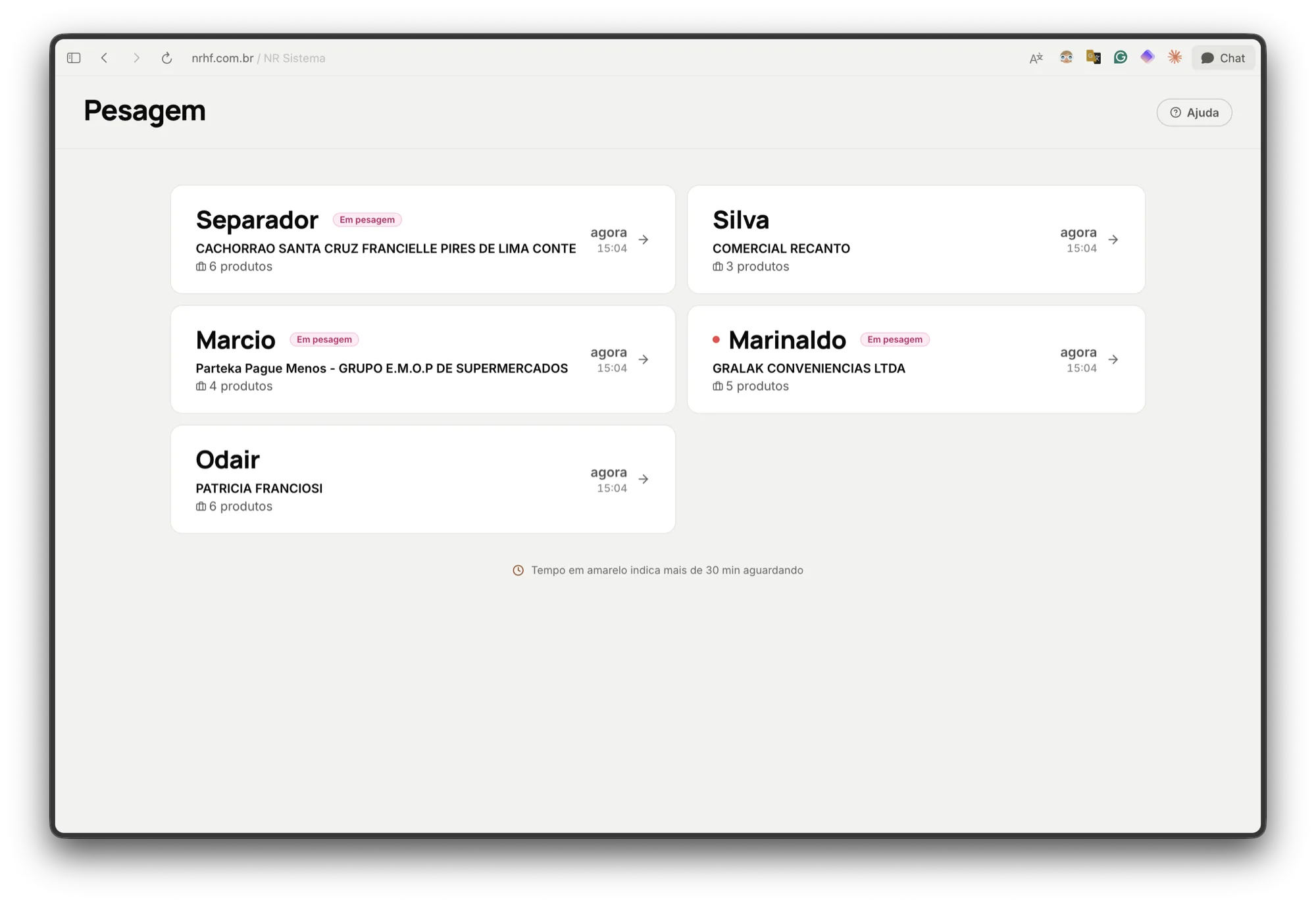
All four floor scales shared a single generic terminal login. To know who weighed a pallet, someone had to walk to the clipboard and read handwritten signatures.
Tare math was calculated manually on pocket devices
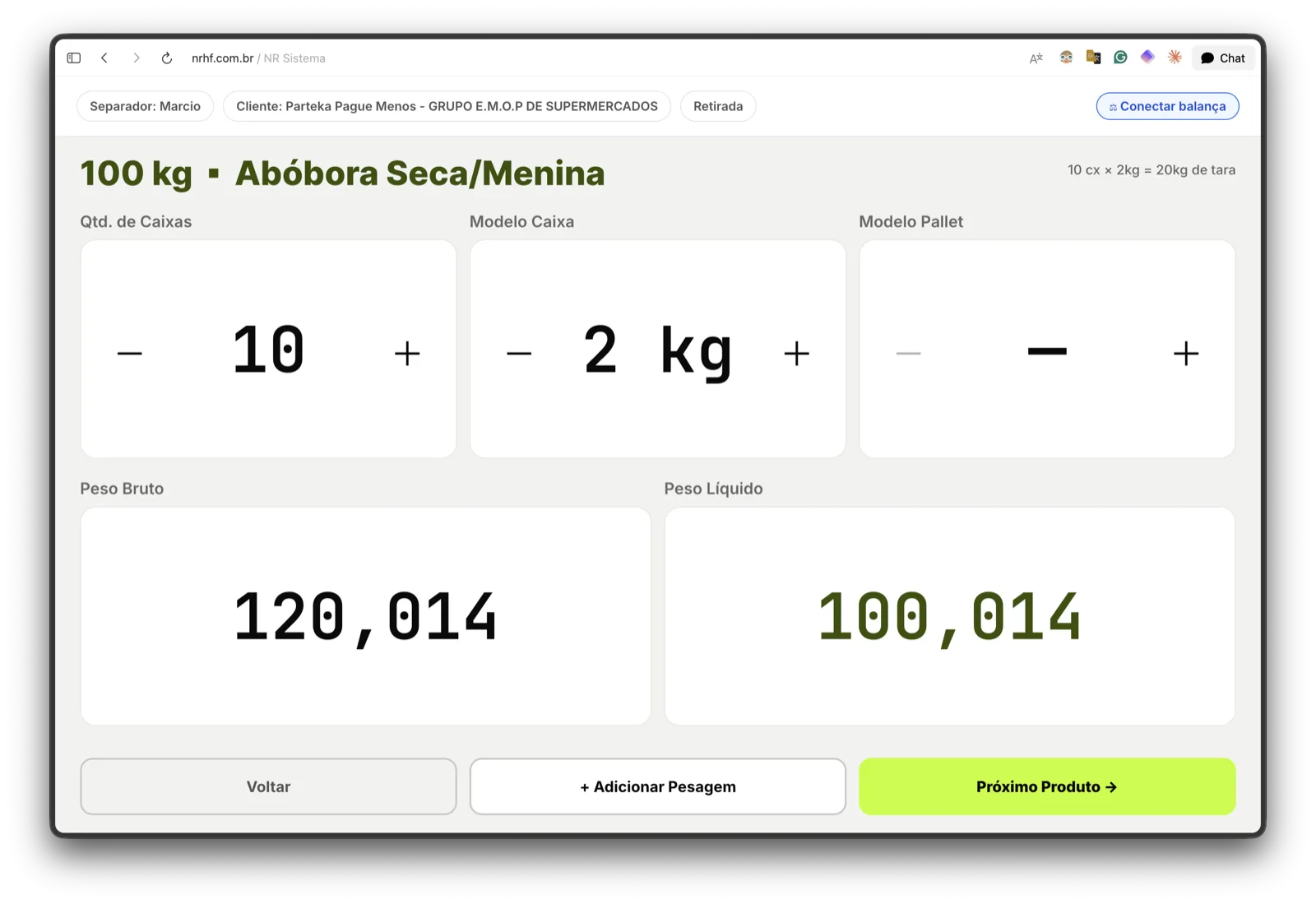
To weigh a pallet with 20 crates, the picker counted crates, multiplied tares on a pocket calculator, added the wooden pallet tare, subtracted from gross weight, and typed the net result. For every single item. For every single order.
The buyer had no inventory balance screen, and refused one
This insight was counterintuitive. I entered thinking the buyer needed a live inventory balance dashboard. His response was immediate:
“Doesn't matter. If the database says I have 100 kg of potatoes and they've gone soft, I'm buying fresh ones anyway.”
The buyer always physically inspects produce before purchasing because buying is about perishable quality, not database scalars. This eliminated what seemed like an obvious requirement—an automated stock-trigger dashboard—and reframed the module: the purchase workflow starts with him walking the warehouse floor; the software is his smart digital notepad, not an oracle.
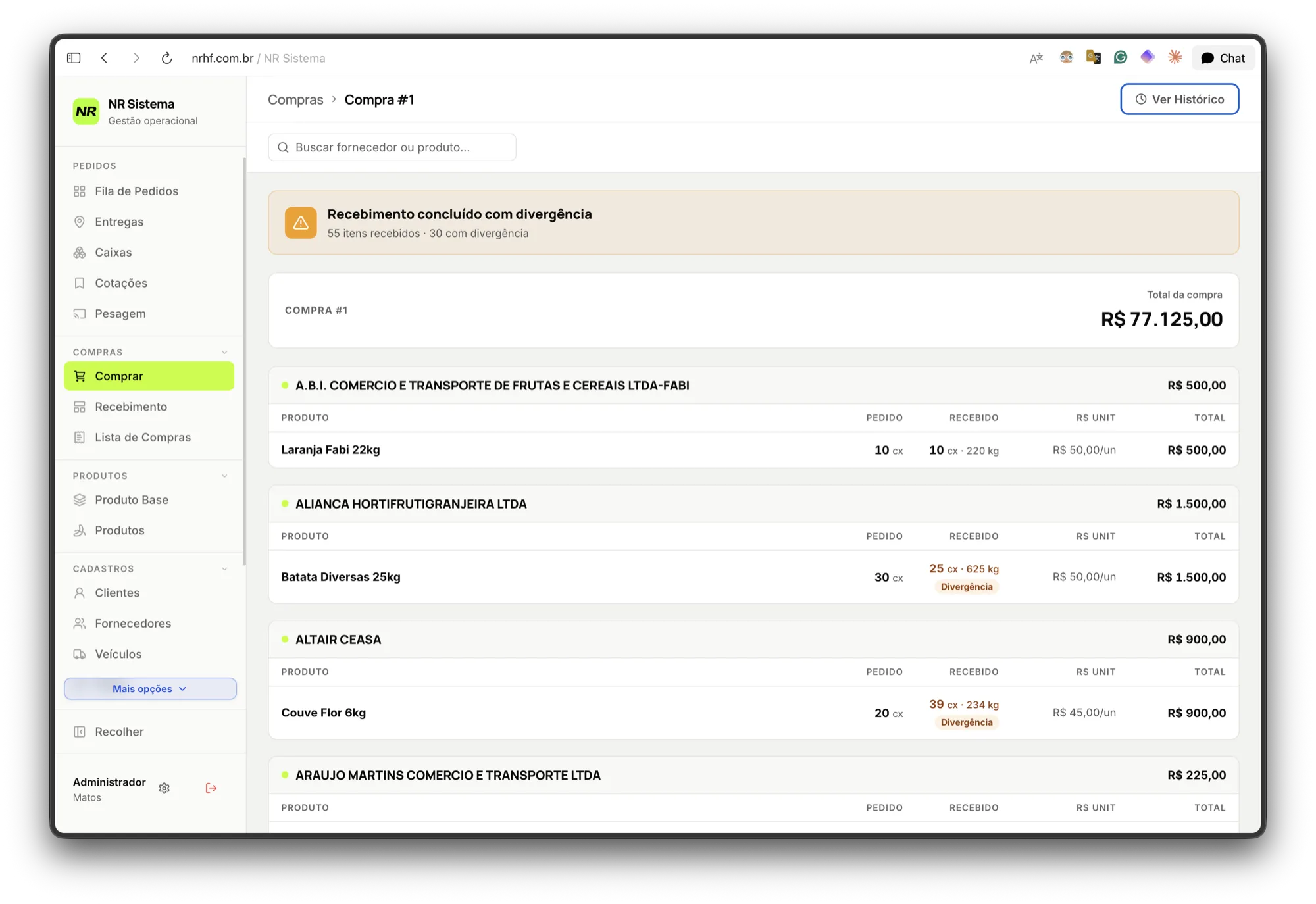
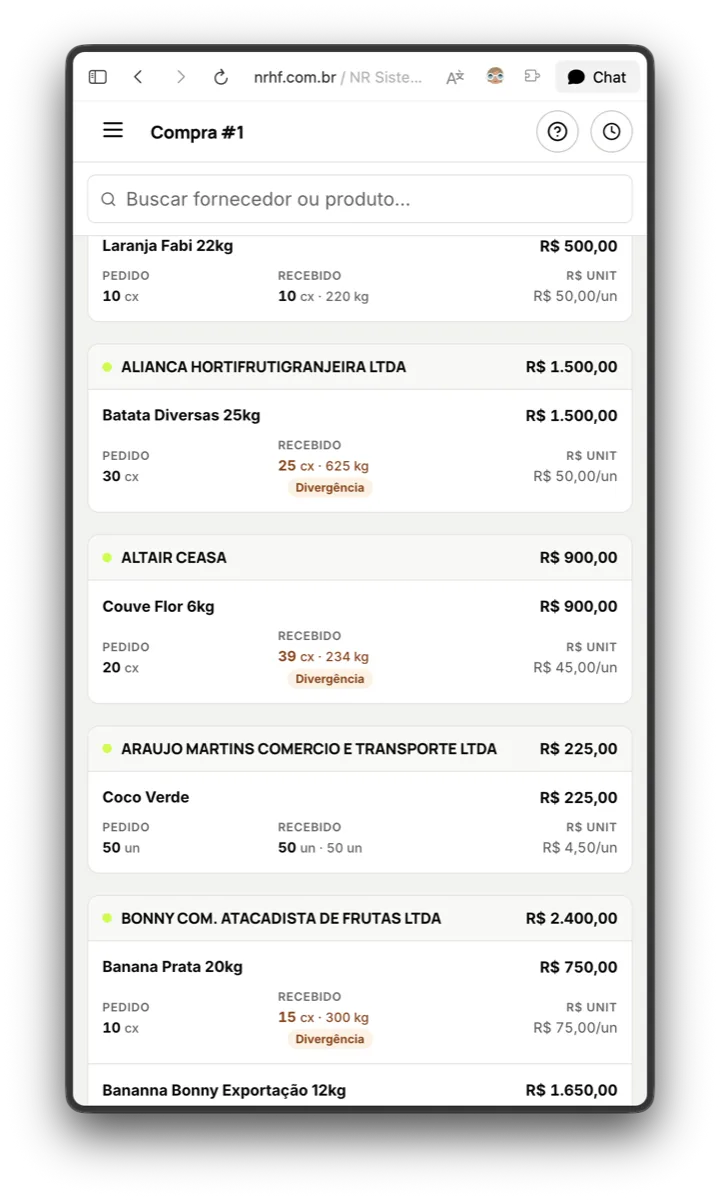
The other side of the same operation, and the reason for the principle below: 55 items received, 30 with quantity discrepancies: ordered 30 crates of potatoes, 25 arrived; ordered 20 cauliflowers, 39 arrived. Discrepancies between purchase orders and what unloads from the truck are not exceptions—they are ordinary business.
03
The principle that defined the product
All discovery converged into a single guiding philosophy:
“We have rules and we have habits. Standard ERPs try to enforce textbook best practices. But in this warehouse, things cannot be as sterile as software manuals preach. We must build a system that embraces their existing rhythm and lets them work almost identically, only much faster and without errors. No blocking dialogs, no forcing workers to pause and learn. It must feel near-instant.”
The system embraces the existing workflow. It does not force the operation to bend to software.
This produced three structural conclusions:
(a) Digitize the physical artifact rather than invent abstract jargon. The tape board became the visual Order Queue. Top-of-board became the “Urgent” badge. The clipboard became automatic worker assignment. Users recognize their real-world process on screen without learning a foreign mental model.
(b) Where human negotiation is the competitive advantage, leave software out. The buyer negotiates with 50 wholesale suppliers over WhatsApp and will continue doing so. Forcing that into an in-app quoting tool would destroy the speed that makes the business work. The software begins after negotiation, the moment it becomes a structured purchasing order.
Knowing where product boundaries stop is the mark of mature product design.
(c) Fix what was broken, and only what was broken. Blind checking was overhauled because it was structurally blind. Supplier WhatsApp chats were left untouched because they were working.
04
Definition: three operational spheres & physical personas
Information architecture was derived directly from physical operations:
Sphere
Who Operates It
What Takes Place
Purchasing & Receiving
Manager, Buyer, Receiving Checker
Decides volume, negotiates externally, records buys, counts trucks. Where inventory originates
Two system “personas” are not humans, by deliberate design: Scale is a physical station profile, and Developer was read-only integration access. Today there are 10 role profiles in total with section-level permissions.
Attendant · desktop
Scale Terminal · dedicated hardware
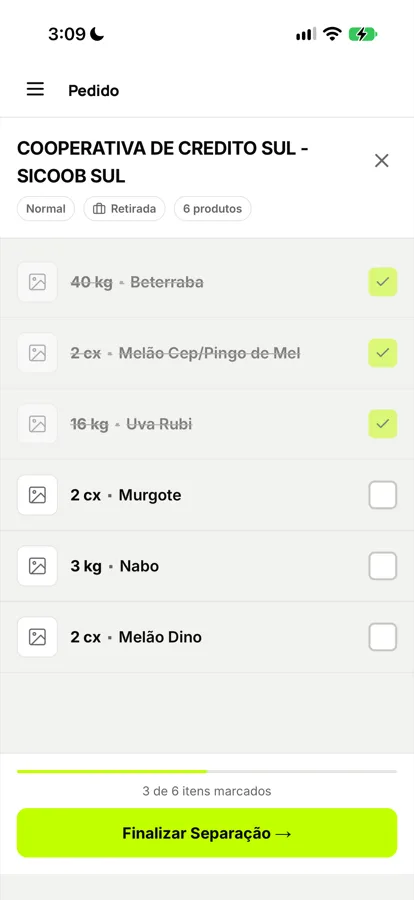
Picker · mobile
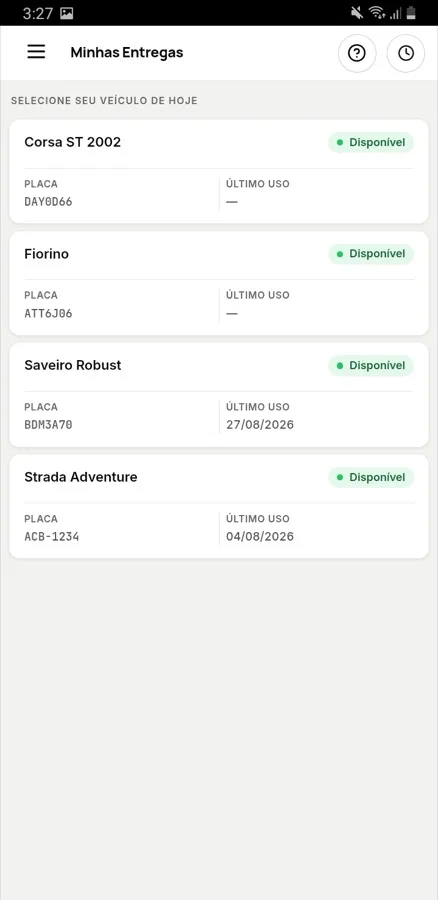
Driver · mobile
Four distinct faces of the unified system. None are responsive desktop shrink-downs: the scale terminal uses large typography readable from several meters away, while mobile views optimize for one-handed standing use.
Language as a design asset
This is a foundational asset that most product designers overlook.
A 563-line domain dictionary serves as the single source of truth for all business terminology. It defines exact names for every persona, context labels, and distinctions between seeming synonyms that mean financially opposite things.
A concrete example from production:
“Checking return”: Returned from checking due to a rejected item.
“Delivery return”: Order went out and returned whole because the client was unreachable. Missing variance is loss.
“Delivery discrepancy”: Client kept part of the shipment. Variance is sale.
“Re-collection”: Returned because an item was forgotten, not because produce was rejected.
Four scenarios a clumsy ERP would lump under “returns,” carrying entirely opposite accounting treatments.
Taxonomy derived from real transaction data
The product catalog was not invented in a spreadsheet. I analyzed all 341 historical SKU names sold over four months, formulating strict categorization rules:
Tray / Pack becomes unit mode: same base product, distinct selling packaging
Numbered grades (Pineapple TP10/12/15/18) become separate base records due to distinct wholesale purchase costs
Size variations affecting price (Large/Medium/Small Tomato) become separate base records
Origin or specific grower becomes separate base records when purchase pricing differs
Plastic Crate HB 623 is not a product; it is tare packaging
Today there are 382 active catalog products.
05
Why two distinct product tables exist
This was the highest-leverage database modeling decision, rooted in product domain reality:
The exact same tomato is purchased in 20 kg wholesale crates, but sold by the kilo to restaurants, packaged in sealed plastic trays for supermarkets, and sold by full crates to institutional buyers. If a system models “Product” as a single flat entity, it creates a fatal dilemma: duplicate SKUs and lose unified inventory balances, or merge them and lose distinct retail pricing tiers.
The relational architecture decouples the physical goods from the sales SKUs:
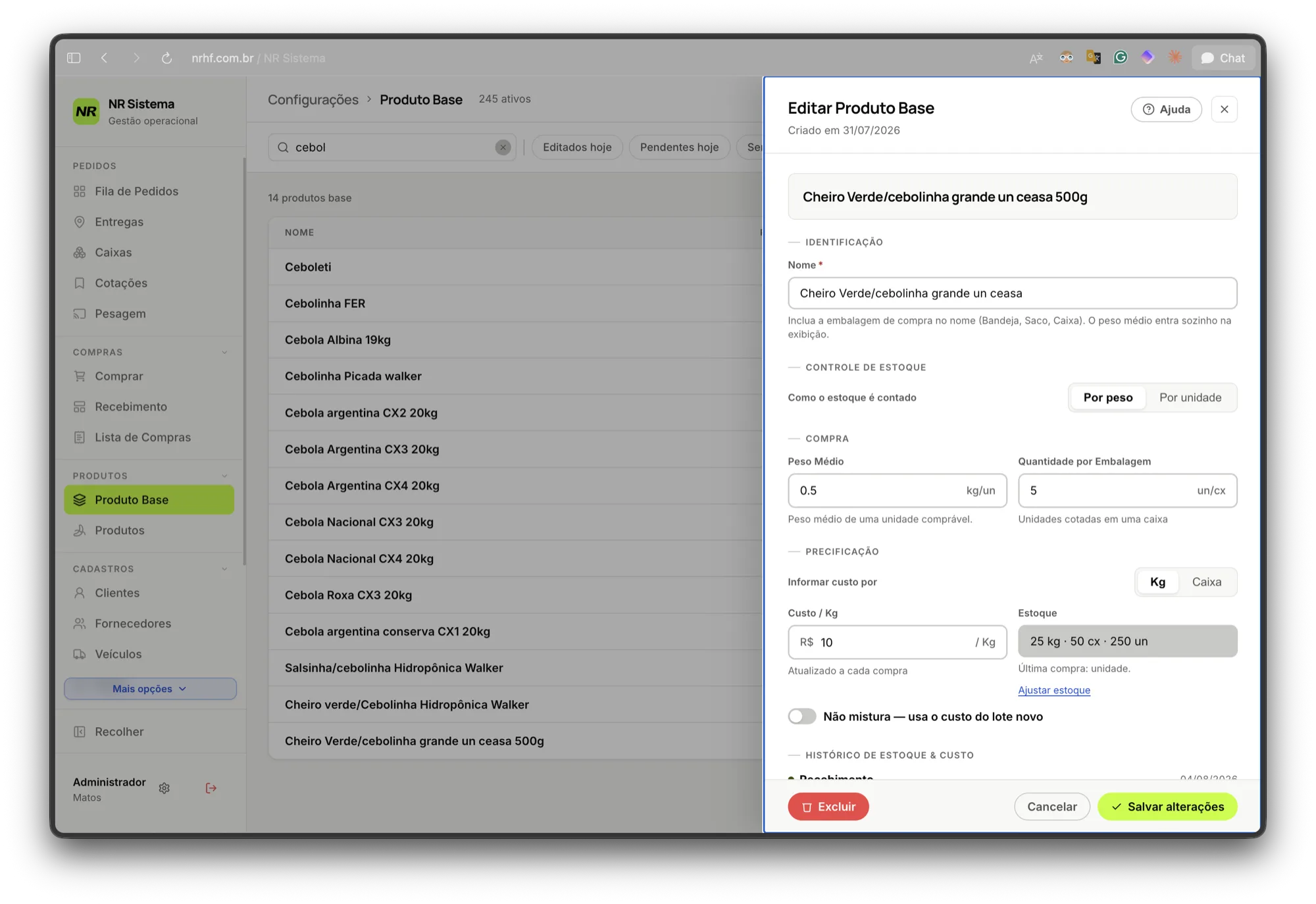
produto_base (Physical Base Product): Physical inventory in the warehouse. Tracks raw stock balance, average unit cost, base tare, and purchasing units. Exactly one row per physical commodity.
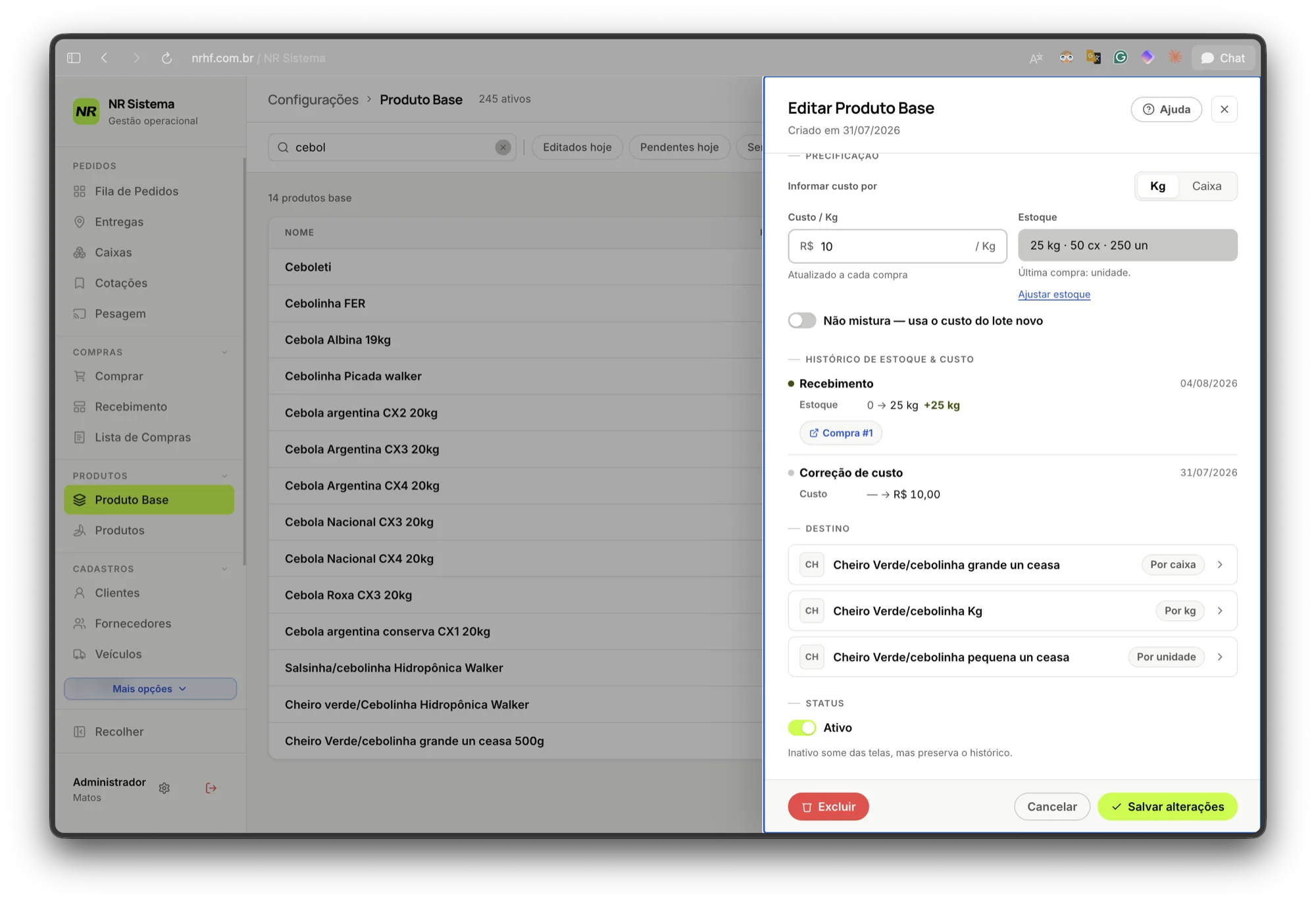
produtos (Sales Offering): What appears on client price sheets. Tracks unit price, target margin, retail package mode, and package tare. Multiple sales offerings map back to one physical base product.
The Base Product record: physical warehouse inventory. Stock tracked across all three operational metrics simultaneously (25 kg · 50 crates · 250 units) because the same produce is bought, stored, and sold in differing dimensions.
Cost, stock balances, and physical weights live on the Base Product. Selling prices and retail margins live on the Sales Offering.
This is not theory: today, 73 physical base products power multiple commercial packaging options cleanly, automatically maintaining unified inventory deductions across kg, unit, and crate modes.
Where the relational mapping becomes concrete: A single Base Product powers three distinct sales offerings—by crate, by kilo, and by unit—each with autonomous pricing and margin rules.
06
Receiving without weighing: the plausible range
A prime example of design derived from raw operational reality: Wholesale purchases are made in kilograms. When the truck arrives at 4:00 AM, dock workers count incoming crates. The naive legacy formula credited crate_count × average_weight.
Why that failed: Counting crates is not weighing mass. 100 kg packed into 22 kg crates occupies 5 physical crates (4 full, 1 half-full). Counting 5 crates credited 5 × 22 = 110 kg, silently generating 10% phantom inventory on every shipment.
The architectural solution: Within a mathematically calculated plausible range, the database credits the exact invoiced weight. Outside that envelope, it credits the crate count. Zero requirement to weigh full 10-ton trucks at the dock.
The physical crate count lands within the range [floor(q), ceil(q)];
And nominal crate weight remains within 20% of requested weight.
Receiving represents company money entering physical inventory. Here, software should guard strictly; letting errors pass costs real money.
07
Decisions worth a conversation
Every architectural choice follows: problem, naive alternative, decision, and rationale.
7.1 Status is a byproduct of real work, never manual overhead
ProblemStandard ERPs require workers to manually click “Mark as Picking” or “Mark as Ready.” Under morning rush, workers skip manual updates, and database state rots.
Naive AlternativeButtons for “mark as picking”, “mark as picked”.
DecisionWorkers never manage status flags. When a picker taps “Start Picking,” the action is recorded. When a scale weighs an item, status updates automatically. Real-world events derive system state.
“You know that annoying requirement where workers must change status just to tell the software something happened? None of that. Statuses must reflect real-time physical operations without workers even knowing status flags exist.”
Ten orders in the “Checked” column with zero manual status clicks. Pickers picked, checkers inspected, and status flowed automatically from real physical actions.
7.2 Two identification flows: PIN identifies without granting privilege
ProblemFour shared scales and six pickers. Full password logins would be abandoned within hours. Generic logins destroy accountability.
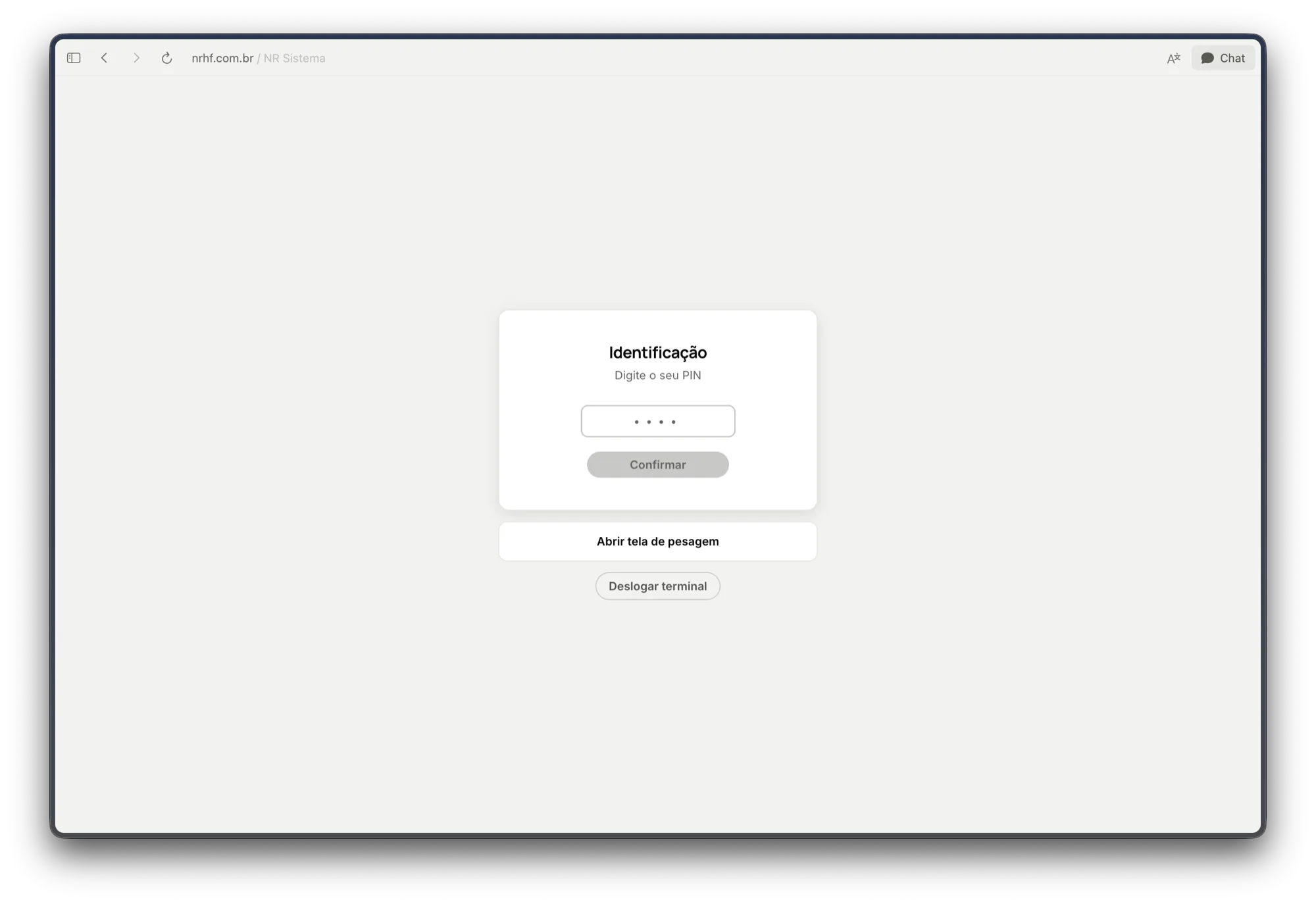
DecisionTwo streamlined paths: when weighing an in-flight order, the terminal lists active pickers—the worker simply taps their own photo/name. For new counter walk-ins, a rapid 4-digit PIN identifies the worker.
Flow 1 · Tap active picker name
Flow 2 · Fast 4-digit PIN
Both identification paths on the same scale terminal. Tapping a name resumes an active order. Entering a PIN identifies the worker without elevating permission levels.
Core Security RuleThe PIN identifies, but does not authorize. A worker entering a PIN operates strictly within the scale station's sandboxed permissions, never inheriting administrative privileges on that terminal.
7.3 Blind checking: audit against the client, not the picker
ProblemTraditional checking verified the picker's weighed slip, making forgotten items invisible.
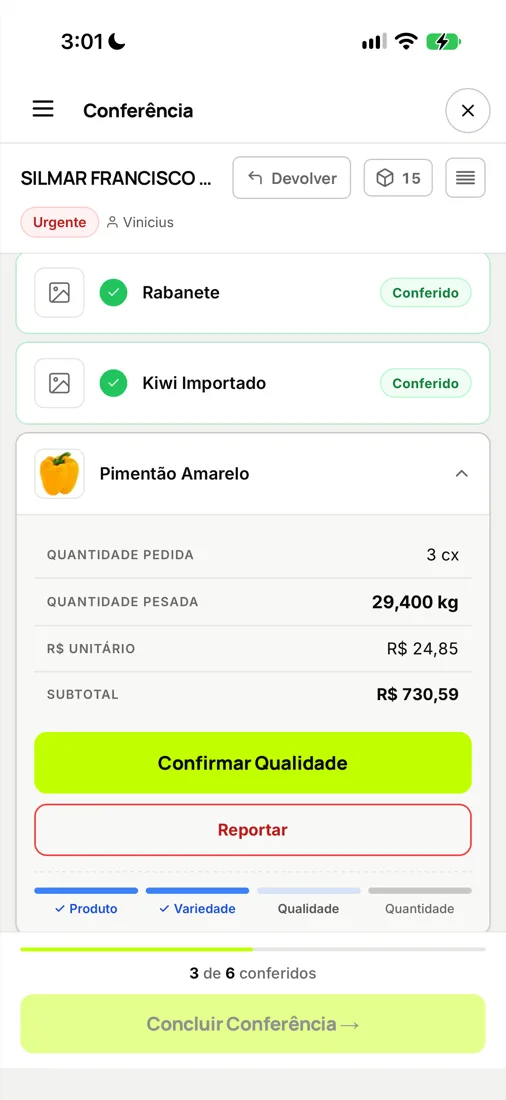
DecisionThe checking screen presents what the customer requested side-by-side with what was actually weighed, enforcing checkpoints across product, variety, quality, and count.
The core discovery resolved on one mobile screen: Requested items on the left, weighed items on the right, ensuring forgotten items are immediately caught.
7.4 Re-collection: when flawed UI creates corrupted data
Post-Launch FindingCheckers returning orders for missing items had only a “Report Defective Item” button. To send orders back, workers began fabricating defect reasons, polluting quality logs.
DecisionIntroduced explicit Re-collection (Recoleta): a dedicated path meaning “item missing from pallet, but product is fine,” preserving audit purity.
TakeawayWorkers bypassing software is a UI design diagnosis, never worker indiscipline.
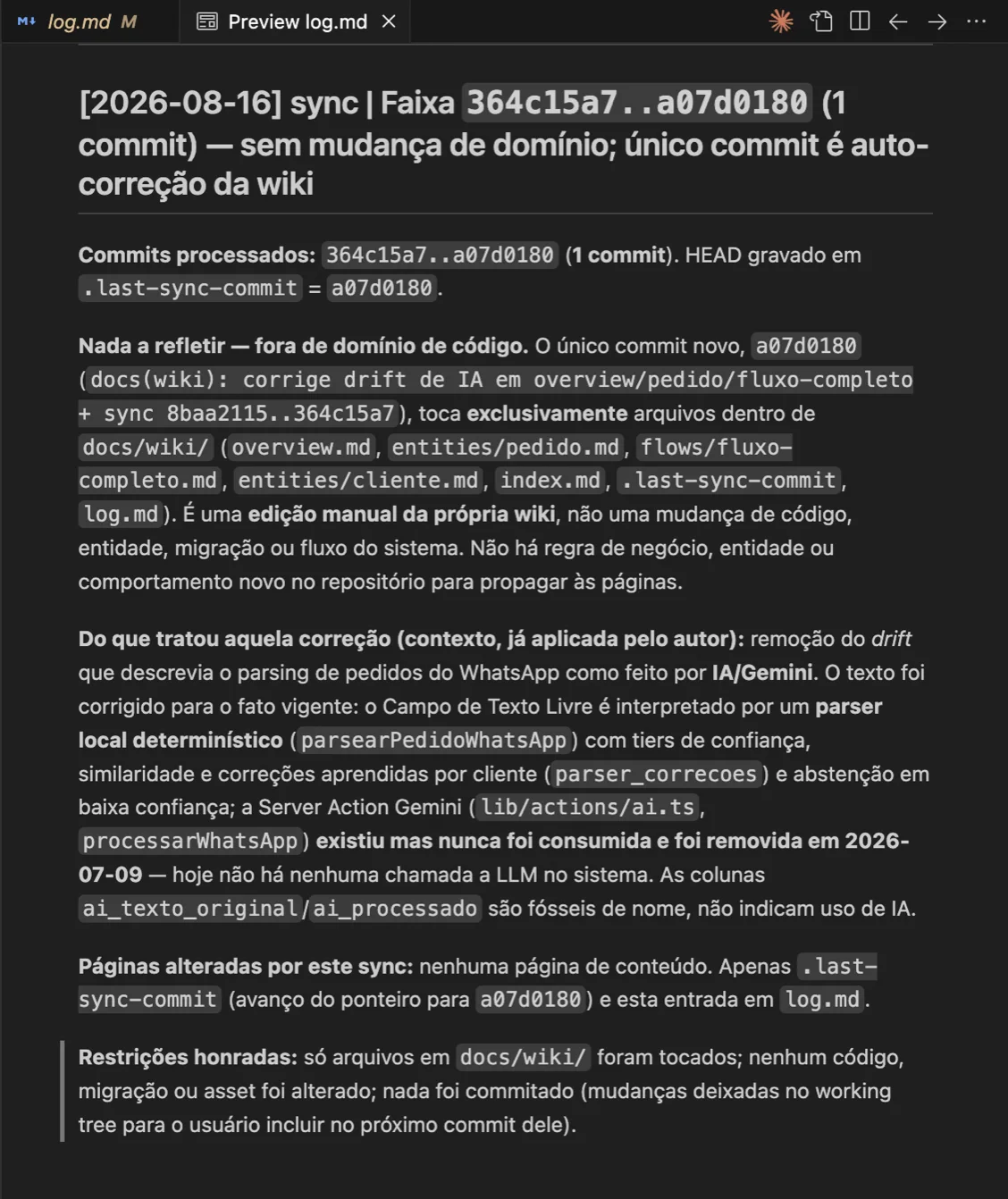
7.5 Zero AI where deterministic parsers and phone keyboards excel
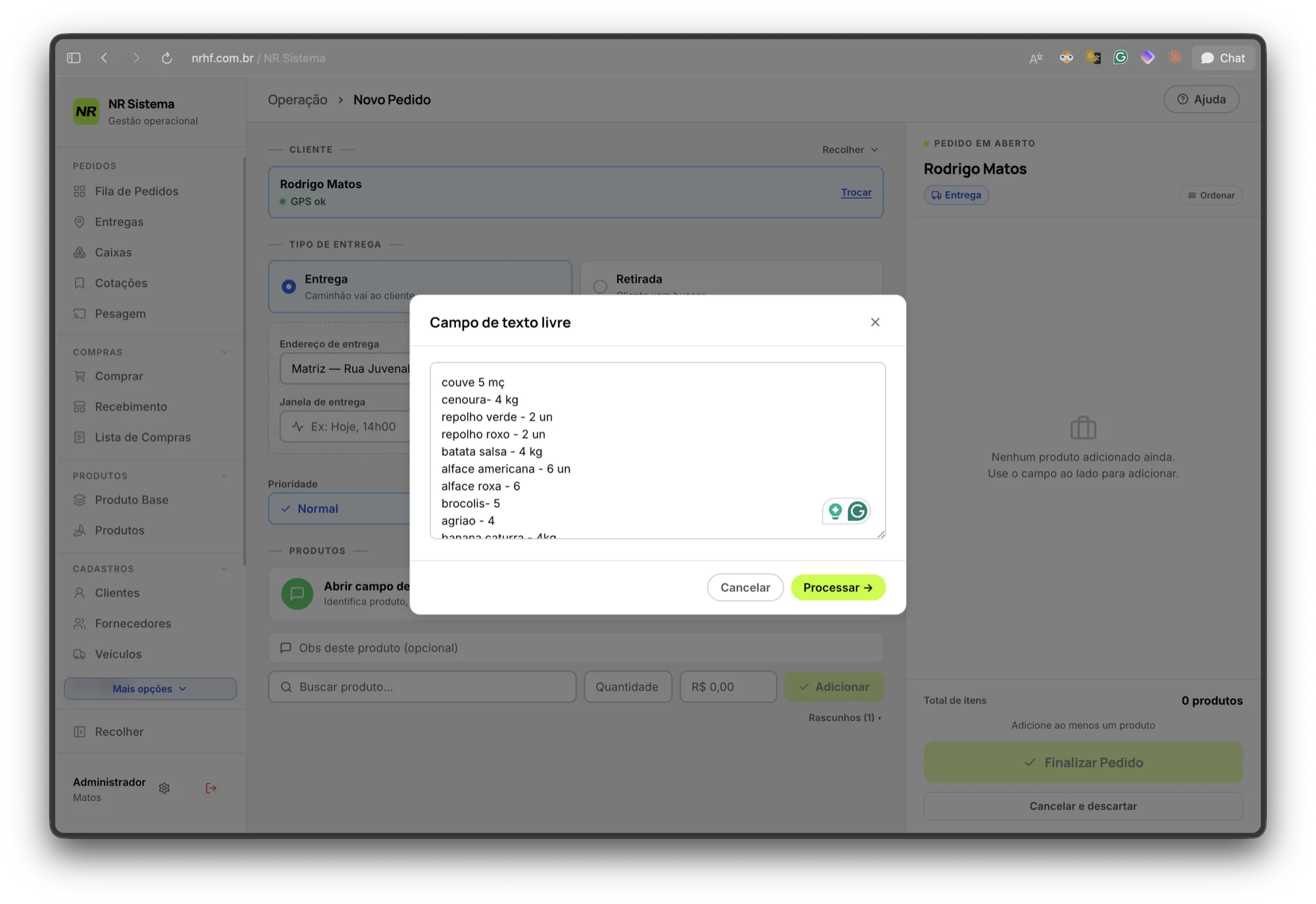
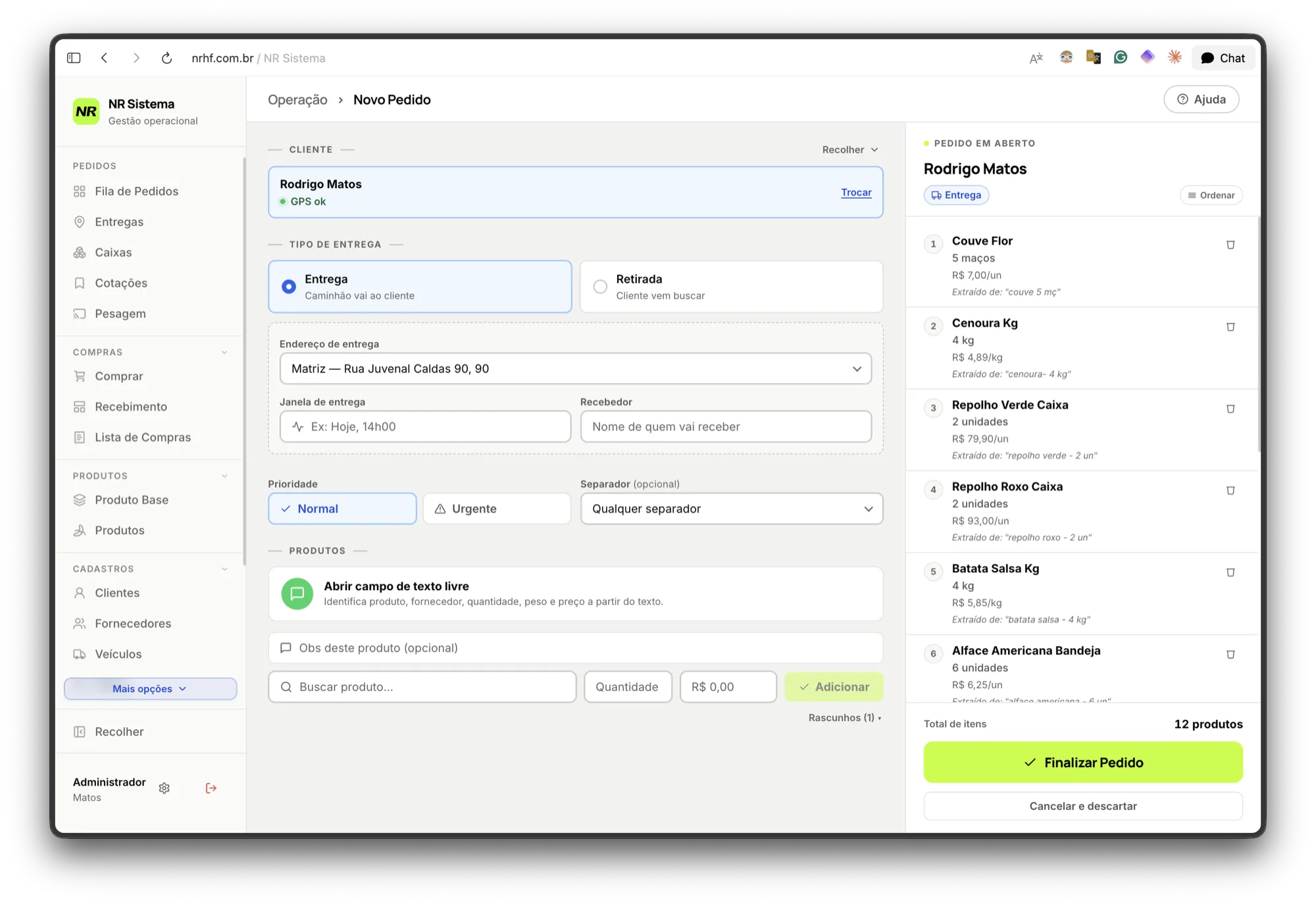
ProblemCustomer orders arrive as messy WhatsApp text: banana 5, pineapple 2, roma tomato 3cx.
Naive Costly ApproachStreaming audio to speech-to-text APIs, then sending transcripts to LLMs.
Engineered SolutionNative mobile keyboards transcribe dictation locally on-device for free. A 996-line deterministic parser resolves quantities and SKUs against the product catalog in milliseconds.
Input · Raw text from WhatsApp
Output · Structured order with audit source tags
Zero LLM API calls between both screens. Notice Extracted from: “kale 5 bunches”: deterministic matching provides 100% testable, zero-cost, instant parsing.
7.6 In delivery, capacity warnings never disable action buttons
RuleIn accounting and inventory, the system strictly blocks invalid states. At the loading dock, vehicle capacity warnings advise the driver, but never disable the confirm button. The worker loading the physical truck knows if an extra box fits; the software does not.
A disabled button here wouldn't prevent an error; it would halt a refrigerated truck.
7.7 Purchase requisition: a single live workflow, not two separate screens
ProblemStandard architecture separates “Create requisition” from “Confirm receiving.” At NR, the same person handles both, and wholesale buying rarely follows paper plans.
DecisionA single live, editable requisition. The buyer updates items directly on mobile at CEASA.
The paper sheet that went to CEASA
The requisition, editable on mobile
The same paper → screen pair: Requisitions remain alive, turning buying discrepancies into structured data.
7.8 Unidentified counter customer: the transit account
ProblemWalk-in clients buying quickly without an existing account.
DecisionA transit account acting as an explicit placeholder that can be assigned later. Cashiers never block, and zero orphan sales are created.
7.9 A single order number for humans
ProblemThe legacy system had global invoice numbers and resetting daily numbers.
DecisionAll human-facing touchpoints speak exclusively the global order number, eliminating confusion over phone calls.
7.10 Never delete, always inactivate. Append-only ledger.
Inventory adjustments live in an append-only ledger. Reversing an inventory loss writes the inverse transaction event rather than deleting historical rows, guaranteeing retroactive accounting integrity.
7.11 The system eliminates pocket calculators
Tare calculation accounts for crate types and pre-weighed, labeled wooden pallets directly in software, subtracting mass automatically from digital scale inputs.
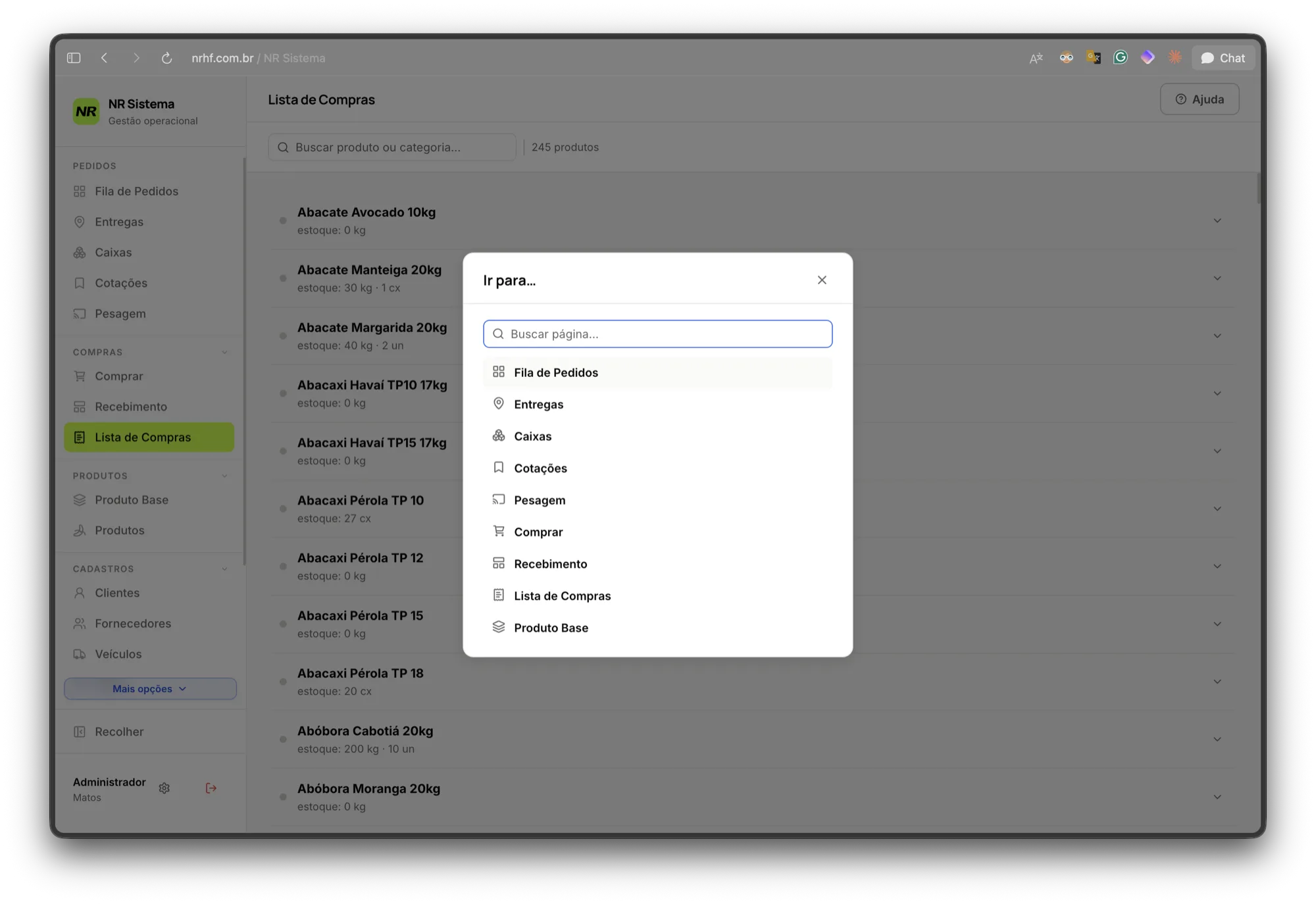
7.12 Keyboard shortcuts: desktop attendants work two-handed
Single-letter shortcuts for global search (Y), theme toggle (T), search focus (B), and new record (N), guarded against input focus and modal overlays.
Global search opened with a single keystroke: Direct navigation without navigating complex menus.
7.13 Dark and light themes: why OLED dark is the default
Dark OLED mode is the primary theme to conserve device battery on warehouse phones during 12-hour shifts. Light mode operates as a calibrated override with separate WCAG AA status tokens.
Light theme · override
Dark theme · base
Tokens are calculated per theme to guarantee WCAG AA contrast against both dark and light surfaces.
7.14 Hardware kiosk lockdown on dedicated Android devices
A single universal APK detects at runtime whether a device is a provisioned company tool. On warehouse phones, it locks the screen into kiosk mode, persists through reboots, allows background GPS tracking for logistics, and provides native offline unlock recovery.
08
Design system: a registry of scars
189token declarations generated from single source
31primitive UI components
206total React components
2complete themes on unified token contracts
Tokens live in a single source of truth, compiled automatically into application code before every build. Zero raw color hex codes exist inside component files.
Every design system rule prevents a bug that has already happened in production.
09
Architecture & engineering metrics
1,718commits, from 22/04 to 14/08/2026
72,626lines of code in 492 TS/TSX files
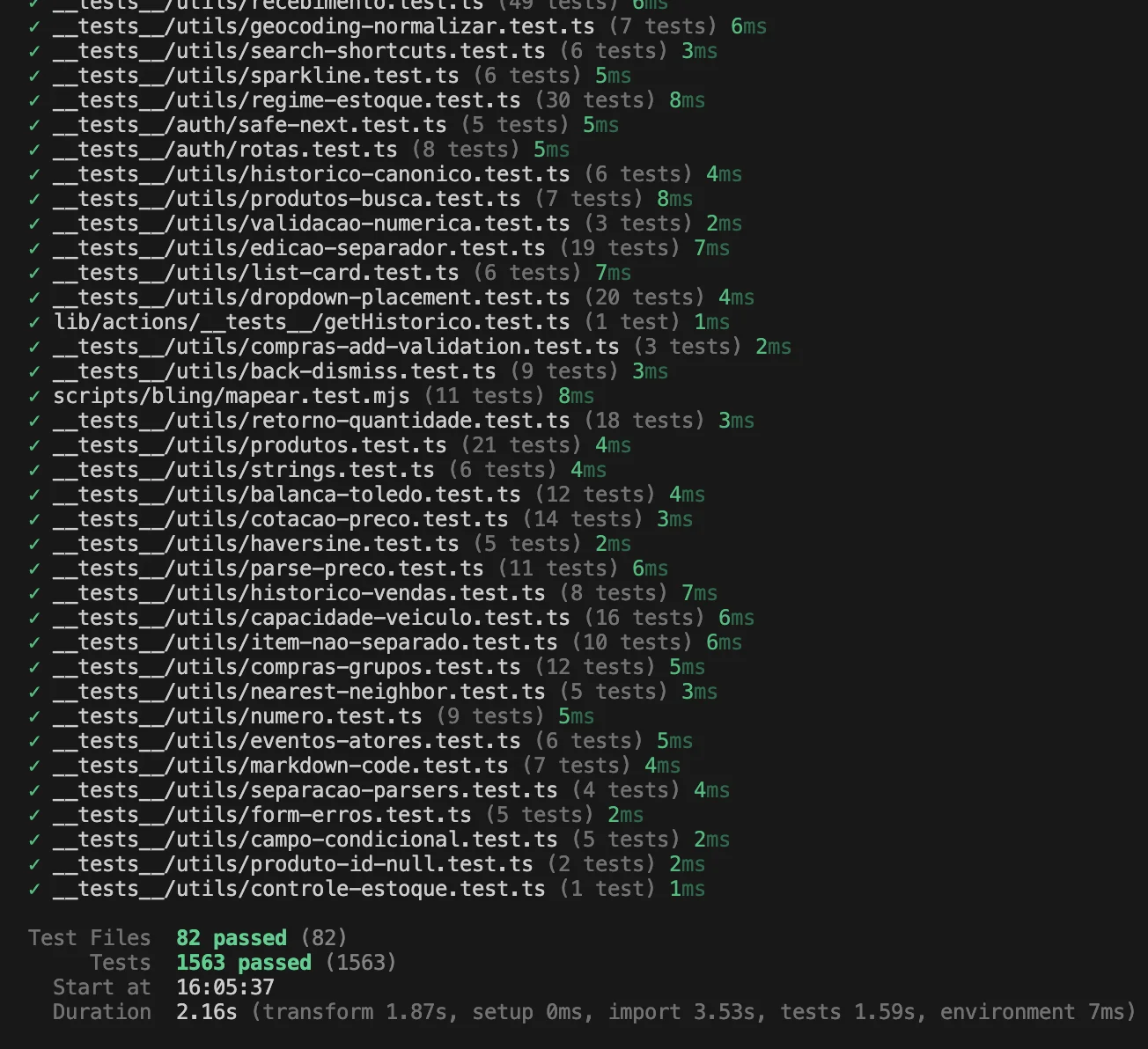
1,563tests across 82 files, running in 2.2 s
313database migrations
44screens across 13 modules
10role-based access profiles
37Server Action modules
50production releases in 44 days
Stack: Next.js 16 with App Router and Server Actions, TypeScript, Supabase (Postgres, Auth, and Realtime), and Vercel.
Production Database:34 tables, 401 columns, 58 Postgres functions, 20 triggers, and 139 indexes.
Company Data in Production:1,504 clients, 1,548 addresses, 1,196 suppliers, 382 products, and 72,992 rows of normalized legacy sales history.
82 files, 1,563 tests, 2.16 s. Fast test execution guarantees that full verification occurs before every deploy.
10
Security
This section is rarely present in design portfolios. It exists here because a system holding customer records, live delivery tracking, and wholesale margins has a real threat model.
Passwordless Authentication
Authentication is exclusively Google OAuth; password logins were disabled server-side, eliminating credential stuffing and password leak vectors.
Default-Deny Row-Level Security
All 34 tables have Row-Level Security enabled, with exactly 5 policies across the entire database. Tables fail closed by default.
11
How I worked with AI
I built this entire system solo with AI pair programming over four months.
What AI did not do: It didn't visit the warehouse floor, didn't conduct worker interviews, didn't spot the blind checking flaw, didn't decide to leave WhatsApp negotiations outside the software. All defining product choices came from physical observation.
What AI did: Implementation velocity, refactoring, and adversarial security code reviews.
The discipline required: LLM review output is treated as candidate samples, not absolute truth. Findings only turn into code changes after failing a reproduction test gate.
12
Production delivery & documentation
50 production releases in 44 days—more than one release per business day. Every release receives an immutable git tag and changelog summary.
The repository houses 346 markdown documents: domain wikis, an 1,858-line dated decision log, technical specs, and regular doc-reconciliation audits where code remains the single technical source of truth.
Location
Content
Domain Wiki 39 pages
Entities, workflows, concepts, and personas. The operational source of truth
Decision Log 1,858 lines, 73 dated entries
What changed, why, alternatives considered, and open questions
Specs & Plans
Design specifications and implementation plans per feature
Reviews
Security reviews, audits, and follow-ups
Planning
Roadmaps and specs for major epics
A decision log entry recording why AI was removed: Transparent documentation of what the software does—and deliberately does not—do.
13
What this case study demonstrates
Competency
Concrete Evidence
Rigorous Field Research
Recurring on-site observation, role interviews, audio transcription, physical artifact audits
Problem Reframing
“What happens if you can't show up tomorrow” re-anchored the entire scope
Discovering Latent Flaws
Identifying and fixing the blind checking vulnerability
Knowing Where Product Stops
Leaving agile WhatsApp supplier negotiations outside the software
 Before · the bulletin board
 After · the live Order Queue